




Lightweight Laptop Displays for Cafés and Hotels: One Pro or a Monitor?
For laptop work in cafés and hotels, start with two concrete options: XREAL One Pro if you want to view a wider desktop through glasses, or Lenovo ThinkVision M14 if you want a compact physical second screen. One Pro's published glasses weight is 87 grams; Lenovo's current M14 specification lists an approximate monitor weight of 0.598 kg. Neither number is the complete packed travel kit. If you need several independent physical screens, compare a compatible laptop extender instead.
The best choice depends on the task: use a physical monitor when a colleague needs to see your screen; consider a wearable display when you want to view the desktop through glasses and can verify fit and readable text. One Pro's Ultrawide means a wider virtual screen, not a promise of several independent virtual monitors. Here is how to compare the options before buying for a small table or a hotel work session.
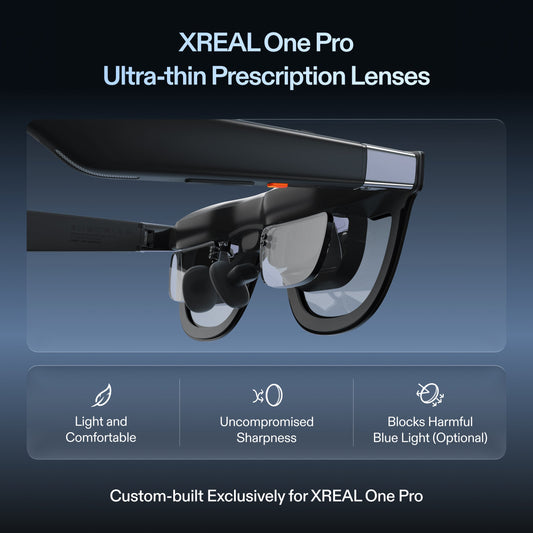
XREAL One Pro: official product photo. View this model’s details.Which travel display format fits your task?
For cafés and hotels, shortlist the format by what you need to see:
Wearable display glasses: consider One Pro when you want a desktop viewed through glasses and can confirm video output, fit and readable text. Its 87-gram specification refers only to the glasses, so compare the complete packed kit.
A portable external monitor: consider a physical screen when you want a display on the table or need another person to see your work. Check its actual size, weight, stand, ports and power requirements.
A laptop screen extender: consider an attachment when separate physical screens are essential. Check the exact laptop mounting dimensions and complete kit weight before assuming it will work on a small table.
As a concrete physical-screen reference, Lenovo's ThinkVision M14 specification lists a 14-inch, 1920 × 1080 IPS panel, two USB-C ports with DP 1.2 Alt Mode, and an approximate 0.598 kg monitor weight. Its listed typical power consumption is 6 W without USB-C output. Those measurements make a useful comparison point for your bag and power plan; verify the exact model, laptop connection and current Canadian availability. A physical panel's 14-inch diagonal and One Pro's perceived virtual-screen diagonal describe different viewing formats, so they are not a like-for-like size comparison.
These are workflow choices rather than a universal ranking. One Pro is a candidate for a wider wearable desktop; someone who needs two separately managed physical displays should first compare a monitor or extender that explicitly supports that arrangement.
What you get with One Pro
The Canadian One Pro product page lists a 57° field of view, a standard virtual screen of up to 171 inches, and an Ultrawide mode reaching 310 inches. Those are perceived screen sizes, not physical screens you unfold onto a table. XREAL's official specifications define the screen-size equivalence at a viewing distance of 4 metres. Use the numbers to understand the viewing format; do not treat them as a guarantee that every small spreadsheet cell will be comfortable to read.
The built-in X1 chip provides native 3DoF Anchor mode without an additional app for that mode. Follow mode keeps the display aligned with your gaze; Anchor mode gives you another way to position it. Your computer still supplies your applications and content. The glasses do not replace your laptop, keyboard, mouse, or internet connection.
Check the exact laptop connection
One Pro's direct connection requires a USB-C port with DisplayPort video output. A USB-C connector by itself does not establish that compatibility. Check the specification for your exact laptop model and the port you intend to use; a charging or data-only port is not enough.
Before ordering, answer these questions:
Does the manufacturer's specification explicitly confirm USB-C DisplayPort video output?
Will that port remain available while you charge the laptop?
If your setup needs an adapter or a hub, has that exact connection been confirmed for video output to the glasses?
Do you need one wider desktop, or several separately managed displays?
If you cannot confirm the connection, contact XREAL support with your laptop model before choosing accessories. Do not buy an adapter solely because its connector looks right.
Will the setup last through a work session?
There is no verified battery-runtime figure here for your particular laptop and glasses combination. Do not plan around a promised number of hours. Check your laptop's charging arrangement and test the complete setup with your normal applications before relying on it away from a power outlet.
Choose for your real working day
Think about the task you repeat most often. For writing with a reference document beside it, ask whether a wider desktop would give you the window arrangement you want. For spreadsheets or detailed design work, prioritize readable text and the visibility of the areas you use repeatedly over a headline screen-size number. If your work depends on several independent monitors, confirm that specific software workflow rather than assuming Ultrawide provides it.
A portable monitor is another option when you want a visible desktop display, particularly if someone beside you needs to see the same content. A wearable display is a different viewing format. Neither removes the need to check the available desk space for your keyboard and pointing device, your power arrangement, or the connection your computer supports.
What a hands-on review tells us
In Tom’s Hardware’s One Pro review, Brandon Hill tested productivity tasks with a 14-inch MacBook Pro and reported that text remained comfortable to view during his sessions. That is one reviewer’s experience with a particular laptop and fit, not a guarantee for every buyer. He also described the purchase price as a significant drawback for occasional use. Treat those observations as a reason to check both readability and how often you will use the glasses before committing to a travel-work setup.
Check fit before committing
XREAL's One Series launch specifications list One Pro at 87 grams. That is the glasses' weight; also account for the cable, case and any accessories in your travel bag. A low weight does not prove a comfortable fit for every wearer or guarantee that a full work session will suit you. If possible, assess text readability and fit with the kind of document you use most often.
One Pro comes in M and L sizes, with listed interpupillary-distance ranges of 57–66 mm and 66–75 mm respectively. Check your IPD and the Canadian prescription-lens options if you need vision correction. Fit and readable text matter more than choosing the largest advertised virtual screen.
Also read the current Canadian return policy before purchase. For a setup you will use while travelling, keep a practical checklist: exact laptop compatibility, charging arrangement, fit, and the applications you need. Avoid planning your first essential work session around equipment you have not tried together.
Common questions before buying
Does Ultrawide create several independent monitors?
Do not assume it does. One Pro's Ultrawide is a wider virtual screen. If your task requires independently managed monitors, confirm that complete computer, software and display setup separately.
Can One Pro run my work apps without a computer?
The glasses display your connected device's content. Your laptop still runs the applications and provides the work environment; the glasses are not a standalone work computer.
Is any USB-C laptop compatible?
No. For the direct connection, the specific USB-C port must support DisplayPort video output. Verify the exact laptop and port rather than the connector's shape.
Next step
If One Pro's display modes match your needs and you have confirmed the connection, view XREAL One Pro in the Canadian store. Check the current CAD price, size options and availability on that page. For a multi-monitor workflow or an uncertain adapter setup, confirm the details with support before ordering.