






XREAL One Pro or Rokid Max: Which Gives You the Simpler Connection?
For a straightforward wired display, choose the One Pro or original Rokid Max configuration that works from your existing source without an extra box. One Pro is the stronger candidate when native screen positioning removes a separate device; Rokid Max deserves a trial when its built-in spherical myopia adjustment meets your needs and reduces lens accessories. Neither brand name proves compatibility with every phone or console.
The shortest connection is the one your source actually supports
Start with video-capable USB-C, source power and the correct glasses cable. A charging-only port cannot be made into a video output by changing the cable. XREAL’s official One/One Pro connection FAQ distinguishes DisplayPort video, power and the powered conversion required for an HDMI source. Confirm the original Max’s source support in Rokid’s model-specific information.
| Your existing source | What to establish first | What to avoid buying on assumption |
|---|---|---|
| Laptop with compatible USB-C video | The precise port outputs DP video and powers the display | An extra spatial box when direct display already meets the task |
| Phone or handheld | The exact model’s wired-video capability, cable and intended app | A hub merely because the plug shape matches |
| HDMI-only console | Powered HDMI-input to USB-C-video-output conversion, explicitly compatible | A reverse-direction USB-C-to-HDMI cable |
| Existing brand-specific station | Its actual video output and supported glasses list | Cross-brand reuse based on a physically fitting connector |
Compare the same source on both models: cold start, intended app with sound, disconnect and reconnect. Write down every required part. A vendor demonstration using a different phone does not establish your source chain.
Compare the functions that change the number of accessories
| Decision point | XREAL One Pro | Original Rokid Max |
|---|---|---|
| Screen positioning | Native X1-powered 3DoF | Confirm the exact source/accessory combination if a spatial mode is required |
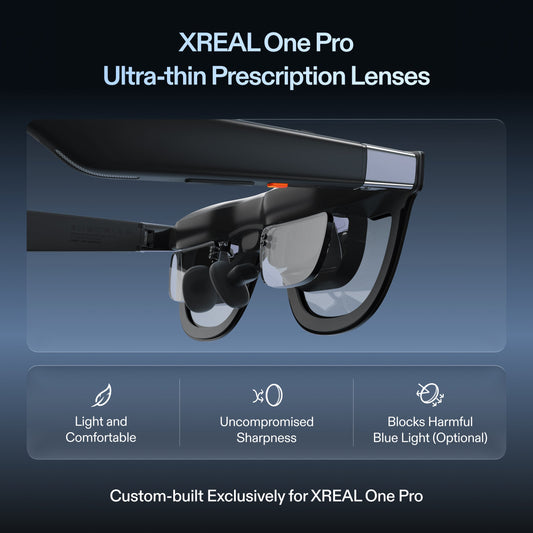
| Spherical myopia | Provider-approved, model-specific prescription insert | Manufacturer lists 0.00 D to −6.00 D adjustment |
| Full prescription needs | Ask the provider to approve both eyes, CYL and AXIS | A spherical dial is not proof of full prescription correction |
| Field of view | 57° | 50° |
| Selection rule | Prefer if native positioning removes something you would otherwise need | Prefer if fit and the supported correction route simplify your complete kit |
A wider field of view is not a measured legibility win. Use the same spreadsheet or game text, normal scaling and finished vision correction. If you already own a working Max setup, switch only after a demonstrated benefit outweighs the cable, insert and accessory replacements.
Canadian cost, power and quiet audio
Obtain a current local quote for the exact glasses, prescription route if needed, required video accessories, power, delivery and applicable checkout charges. Compare the complete working setup in one currency. This guide does not revalidate older local price examples.
The glasses use power from the connected source. Record battery percentage drop for the same task and duration under matched settings; a refresh-rate specification cannot predict phone runtime. For shared spaces, test your actual audio level and use compatible headphones if sound leakage matters.
A purchase rule you can use immediately
Choose One Pro if your source connects as demonstrated, text and fit pass, and native positioning solves a requirement without another necessary box. Choose the original Max route if it passes the same test with fewer replacements or a better supported correction path. Keep the existing system if neither delivers a clear task benefit. Check the Canadian seller’s hardware and custom-lens terms separately before paying.
Model-specific images and specifications
Manufacturer specifications checked on 6 November 2026. Images identify the named models; they are not to scale. Maximum specifications do not establish the result of every source, mode or fitted setup. Foreign-store links below are technical references, not local availability or price offers.
XREAL One Pro
Source: XREAL · XREAL One Pro
| Parameter | Manufacturer specification |
|---|---|
| Field of view | 57° |
| Per-eye resolution | 1920 × 1080 |
| Maximum refresh rate | 120 Hz |
| Spatial positioning | Native 3DoF; X1 chip |
| Weight | 87 g |
| IPD sizes | M 57–66 mm; L 66–75 mm |
Rokid Max
Source: Rokid · Rokid Max
| Parameter | Manufacturer specification |
|---|---|
| Field of view | 50° |
| Display | 1080p |
| Myopia dial | 0.00 D to −6.00 D |
Verified product facts
| Parameter | Documented value / condition |
|---|---|
| XREAL One Pro | 57° field of view; X1 native 3DoF; up to 120 Hz |
| IPD sizing | M: 57–66 mm; L: 66–75 mm. Verify fit before ordering |
Product details are taken from the cited manufacturer documentation. Confirm the selected regional product and its current instructions.

Frequently asked questions
Does native 3DoF make One Pro simpler for every buyer?
No. It helps when positioning is a function you need and would otherwise buy separately. If a simple mirrored image is enough, test direct connection on both models before valuing extra features.
Can the original Rokid Max myopia dial replace my insert?
It may suit a supported spherical need within the stated 0.00 D to −6.00 D range. It does not establish correction for cylinder, axis or all unequal-eye prescriptions; have the complete requirement checked.
Can any USB-C phone connect directly?
No. Confirm the exact phone’s wired-video output, required power, cable and app. The shape of the socket and charging support alone are insufficient.
Will a console need an adapter?
For an HDMI-only source, plan a compatible powered converter in the correct HDMI-input-to-USB-C-video-output direction. Confirm the output mode and glasses compatibility before ordering.
Which price should I compare in Canada?
Compare complete Canadian quotes in the same currency: model, necessary correction, cable, conversion, power and applicable delivery terms. The One Pro prices stated here are checked listing values, not a universal bundle quote.